Tuesday, 16 August 2011

26 Antivirus for Nokia & Sony Ericsson Phone

Viruses can spread anytime, anywhere without letting you know that they are spreading. So you should be ready to kill them as soon as they attack in your phone. So here are 26 antivirus applications for your Nokia and Sony Ericsson Phones.

Simply Download the below package and install them according to the device mentioned.

Demo Screenshot .:

26 Antivirus for Nokia & Sony Ericsson Phone


Is Studying Hard/Boring for you..?

Go:
www.learnnext.com
*A website for students that teaches topics with animations

Did you Lost Your ATM Card..?

Call to Block it...
SBI->1800112211
Andhra Bank->18004252910
ICICI->1800224848
Axis Bank->23418888(HYD)
UCO->18003450123
Union->1800222244

Friday, 12 August 2011

Facebook Status Update without Internet for Airtel


Well if you are a addict of Facebook than you might never leave it well now that’s possible with as a new service called U20pia has collaborated with Airtel to give you the premium Experience on Airtel Devices without the need of internet so now where ever you are access Facebook everywhere anytime.

Updating Facebook status is free, but to use other features like viewing, commenting, posting on friends walls, confirming friend requests, ‘Like’ news feeds, view notifications and finding and adding friends, you have to pay a minimal charge of Re 1 per day.
The users will have to dial *325# (“*fbk#” for non-qwerty mobile handsets) from their handsets which will open a menu that will prompt the user to enter their Facebook username and password and after the one-time registration, a text menu is displayed for browsing through content.

Friday, 29 July 2011

Nokia GSM Secret Codes

Nokia GSM Secret Codes


** Register and Activate
* Activate
## De-Register (and Deactivate)
# Deactivate
*# Check Status.

Call waiting:
--> Activate call waiting *43*#
--> Deactivate call waiting #43##
--> Check status of call waiting *#43#

CLIR: Presentation of one's own number to the to the called party
--> Activate CLIR **31#
--> Activate CLIR for the actual call *31#number
--> Deactivate CLIR ##31#
--> Deactivate CLIR for the actual call #31#number
--> Check status of CLIR *#31#

--> Change call barring code **03*OldCode*NewCode*NewCode#

--> Change call barring code **03*330*OldCode*NewCode*NewCode#

--> Change PIN code **04*OldPIN*NewPIN*NewPIN#

--> De-register all call diversions ##002#

--> Activate unconditionally divert all calls *21#

--> De-register unconditionally divert all calls ##21#

--> Deactivate unconditionally divert all calls #21#

--> Check status of unconditionally divert all calls *#21#

--> Divert on no answer to number and activate **61*number#

--> Activate divert on no answer *61#

--> De-register divert on no answer ##61#

--> Deactivate divert on no answer #61#

--> Check status of divert on no answer *#61#

--> Divert on not reachable to number and activate **62*number#

--> Activate divert on not reachable *62#

--> De-register divert on not reachable ##62#

--> Deactivate divert on not reachable #62#

--> Check status of divert on not reachable *#62#

--> Divert on busy to number and activate **67*number#

--> Activate divert on busy *67#

--> De-register divert on busy ##67#

--> Deactivate divert on busy #67#

--> Check status of divert on busy *#67#

--> Check status of barr all outgoing calls *#33#

--> Activate barr all calls **330*code#

--> Deactivate barr all calls #330*code#

--> Check status of barr all calls *#330*code#

--> Activate barr all outgoing calls **333*code#

--> Deactivate barr all outgoing calls #333*code#

--> Check status of barr all outgoing calls *#333#

--> Activate barr all incoming calls **35*code#

--> Deactivate barr all incoming calls #35*code#

--> Check status of barr all incoming calls *#35#

-->Activate barr all incoming calls when roaming **351*code#

-->Deactivate barr all incoming calls when roaming #351*code#

-->Check status of barr all incoming calls when roaming *#351#

-->Activate barr all incoming calls **353*code#

-->Deactivate barr all incoming calls #353*code#

-->Check status of barr all incoming calls *#353#

Sunday, 24 July 2011

Converting 1 GB Memory Card to 2 GB


We all use memory sticks to store music, images, videos so that we can take them on the way to enjoy them easily. But what if memory gets less to store all your music and you don’t have enough money to buy another one, well has the trick for you to make your 1GB Memory Card to 2Gb. 
Follow the steps:
1. This trick only works on a 1Gb memory card so make sure your memory card is 1Gb and now follow the below steps.
2. Now remember to backup your data on your memory card as we are going to format that card.

3. Now download Skymedi 2GB Fix Software
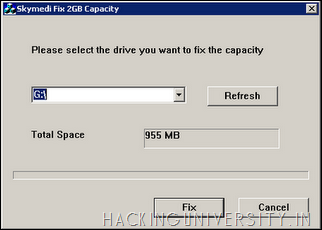
4. After downloading the above software open that software and you will see something like below:
Convert 1GB Memory Card to 2GB
5. In the above image you can see it is saying that Total Space 955 MB, that’s because I have inserted a 1GB memory card so you also have to insert 1 GB card and it will show you the same thing.
6. Now after you insert your card and open the software you just have to click FIX as mentioned in the above image.
7. Now as soon as you click on FIX process will start up and it will you for the confirmation of the formatting step it has to take so click Yes and that’s it.
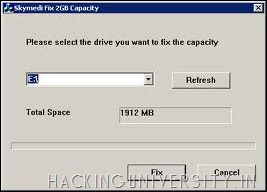
8. Now after the process is complete just remove the Memory Card and Reinsert it and you will see a gain in the storage space which is really awesome thing for an Non - Investor.
Convert 1GB Memory Card to 2GB
9. Now as you can see the above image is saying 1912 MB for the same 1 GB Memory Card so enjoy this trick and gain some huge space from 1 Gb sticks.
NOTE: This trick works on some memory cards so just have a try and comment below with a if this worked for you and we are not responsible for any damage this software gives on your memory stick, so use this software @ your own risk.

How to Protect an Email Account from being Hacked

This post will make you know how to protect your email account from being hacked. Nowadays  most of the people say “My Email account is hacked…”. Now one question which arises in our mind is: “Is it so easy to hack an email accountOr Is it so difficult to protect an email account from being hacked?”. The single answer to these two questions is “Absolutely NOT!”. It is neither easy to hack an email nor difficult to protect an email account from bieng hacked. If this is the case, then what is the reason for many people to lose their accounts? 
The answer is very simple. They don’t know how to protect themselves from being hacked! In fact most of the people who lose their email accounts are not the victims of hacking but the victims of Trapping. They lose their passwords not because they are hacked by some expert hackers but they are fooled to such an extent that they themselves give away their password.
Are you confused? If so continue reading and you’ll come to know…
Now I’ll mention some of the most commonly used online scams which fool people and make them lose their passwords. I’ll also mention how to protect your email account from these scams.
1. WEBSITE SPOOFING
Website spoofing is the act of creating a website, with the intention of misleading the readers. The website will be created by a different person or organisation (Other than the original) especially for the purposes of cheating. Normally, the website will adopt the design of the target website and sometimes has a similar URL.
For example a Spoofed Website of Yahoo.com appears exactly same as Yahoo Website. So most of the people believe that it is the original site and lose their passwords. The main intention of spoofed websites is to fool users and take away their passwords. For this,the spoofed sites offer fake login pages. These fake login pages resemble the original login pages of sites like Yahoo,Gmail,Orkut etc. Since it resemble’s the original login page people beleive that it is true and give away their username and passwordsby trying to login to their accounts.
Solution:
  • Never try to login/access your email account from the sites other than the original site.
  • Always type the URL of the site in the address bar to get into the site. Never click on the hyperlink to enter the site.
2. BY USING KEYLOGGERS
The other commonly used method to steal password is by using a Keylogger. A Keylogger is nothing but a spyware. The detailed description of keylogger and it’s usage is discussed in the post Hacking an email account. If you read this post you’ll come to know that it is too easy to steal the password using a keylogger program. If you just access your email account from a computer installed with keylogger, you definitely lose your password. This is because the keylogger records each and every keystroke that you type.
Solution:
Protecting yourselves from a keylogger scam is very easy.Just install a good anti-spyware program and update it regularly. This keeps your PC secure from a keylogger. Also there is a program called Anti-keylogger which is specially designed to detect and remove keyloggers. You can use this program to detect some stealth keyloggers which remain undetected by many anti-spyware programs.
3. ACCESSING YOUR EMAIL ACCOUNT FROM CYBER CAFES
Do you access your email from cyber cafes?  Then definitely you are under the risk of loosing your password.In fact many people lose their email account in cyber cafes. For the owner of the cyber cafe it’s just a cakewalk to steal your password. For this he just need’s to install a keylogger on his computers. So when you login to your email account from this PC, you give away your password to the cafe owner. Also there are many Remote Administration Tools (RATs) which can be used to monitor your browsing activities in real time.
This doesn’t mean that you should never use cyber cafes for browsing the internet. I know, not all the cyber cafe owners will be so wicked but it is recommended not to use cafes for accessing confidential information. If it comes to the matter of security never trust anyone, not even your friend. I always use my own PC to login to my accounts to ensure safety.
So with this I conclude my post and assume that I have helped my readers to protect their email accounts from being hacked. Please pass your comments…

Friday, 22 July 2011

How to Protect Your Computer from Keyloggers

Keyloggers have been a major problem today as it does not require any prior knowledge of computers to use it. So hackers mainly use keyloggers to steal your passwords, credit card numbers and other confidential data. Below are some methods through which you can protect your computer from keyloggers


Use a Good Antivirus

This is the first and basic step that you need to take in order to protect your computer from keyloggers. Use a Good antivirus such as Kaspersky, Norton or Mcafee and update it regularly.

Use a Good Antispyware

Since keyloggers are basically spywares, if you are a frequent user of Internet then you could be exposed to thousands of keyloggers and spywares. So you should use a good antispyware such as NoAdware.

Antilogger can be Handy